
Intake allows providers and families to begin to build a positive partnership. The service provider gathers client information and shares information about PIC. The goal is to help families orient themselves to our service model, gather family’s history, complete intake paperwork, and prepare for evaluations. The following activities usually take place over the course of one visit.
| Action | Reference | EHR Documentation |
|---|---|---|
Describe Program Philosophy/Eligibility
|
| Intake Note Include in note the information gathered and that program description was reviewed. |
Family and Child Assessment Interview Gather information about family’s everyday routines and activities, strengths, pertinent medical and family history. |
| Tabs: Objective
Intake
Pediatric Medical History link |
Complete Procedural Safeguards Procedural Safeguards acknowledgment forms are signed by the parent to assure that PIC is transparent and they have received information about our processes. |
| Complete and send to family in Admin Tab on RT. Medical record request is submitted to Admin Support to request. |
| Obtain ROI for Medical Records and other providers/caretakers | Release or Obtain Information | Complete and submit forms in child’s permanent file in Admin Tab. Medical record request is submitted to Admin Support admin@picak.org to request immediately following intake. |
| Set-up Eligibility Evaluation | Prior Written Notice: indicate evaluation is warranted | Appointment in Electronic Health Record in Admin Tabe PWN in Admin Tab |
Notes: Background Summary should be a short and concise write-up that addresses the information gathered at the intake interview, and references information from the referral documents. The purpose of this section is to inform a reader about the family concerns, the child's relevant medical history, strengths and challenges, routines or interests, social supports and if necessary any involvement in other services. This should be written by the provider and NOT copied from the referral specialists. This document supports the providers in developing and justifying an eligibility decision when paired with the evaluation and observations. As well, it informs any future providers about the status of the family and child at intake in relationship to the developmental delay.
Intake Provider Procedure/RainTree Intake Note Guidance
- Note: These directions assume you have an Intake appointment scheduled in your Raintree calendar.
- RainTree Go to DASHBOARD. Double-click on the appointment from the dashboard.
- The Prompt box will appear, click on Check In Appt.
- Work your way through the Intake documentation, and complete every tab. Intake note will appear, enter information following instructions.
- If the parent declined an assessment/evaluation at the Intake, please check the ‘Family Declined Family Assessment’ checkbox
Complete Intake Note in RT using tabs.
*Referral Notes (include any important notes):

*Family Main Concern and Priorities AND EACH ADDITIONAL TAB for the Child and Family/Home and resources/Routines/Times, Strengths and Challenges:

*Using the information from the family assessment, complete the following three tabs, for home and resources, routines and times of day that are challenging and easy:

*Pediatric Medical History: click into the to complete with the family online, or return to the document to complete after the intake home visit:

*Background Summary AND EACH ADDITIONAL TAB for the Child
Written a brief summary in narrative format, include the following (in addition to the Ped Med Hx, but no need to repeat):
- Birth History
- Medical Conditions or Concerns
- Family History
*Clinical Observations (optional)
If you had the opportunity to observe the child during the intake visit, and if desired, this is a place to note--what you see that would inform the evaluation--for the provider only. This is a place to note observed information on the following motor skills, learning skills/understand skills, social skills and emotional behavior, self care skills, other (eating, sleeping, dressing, sensory, transitions, temperament)
*Other Pertinent Information
Include information that does not fit in to other areas. Information that is not intended to be disclosed to others, such as mental health information. If you wish for this information to print in the intake note, check the ‘Show in Printed Intake Note’ box.
*Plans for Further Evaluation: enter the date and time if set.
Entering Charges
Click on Charges tab and complete with time in/time out (units will calculate):
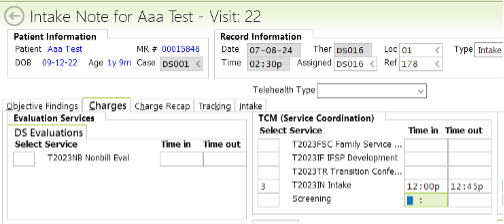
Then, F10 to Save.
Intake Preview Note will appear
Look to lower left corner of document to save and sign off, click button Click Save and Sign Off button:
The units in the charges tab will go to Billing Review.
If you started through your Dashboard, you’ll be taken back to your Dashboard.
Signatures
Have family complete signature forms—send the forms to the family from RT on the Admin tab
Alternatively, take paper forms and have signatures uploaded to client file in RT by Admin staff.
Additional Considerations
What to do when the Intake takes place over 2 days
If an intake takes place over two or more days, the provider will compile the results for all the days within the intake note that is dated the first day the intake was conducted.
Then the provide will complete an FSC note for the additional days, no charges attached.