
NICU Developmental Screenings Purpose
Referral Specialists send all NICU referral to PIC managers to review and determine if the referrals are recommended to be initially screened in-house, or go to evaluation. Screens are assigned in teams. OT, PT are appropriate provider type due to need for a motor therapist. SLP is appropriate only when there is solely a feeding concern. Providers manage the client scheduling and communication.
Billing Procedures
No screenings (NICU, developmental, hearing, or vision) are billed out, so the only necessary billing documentation is to list the screening clock times under the Long Term Therapy Note type “Screening”
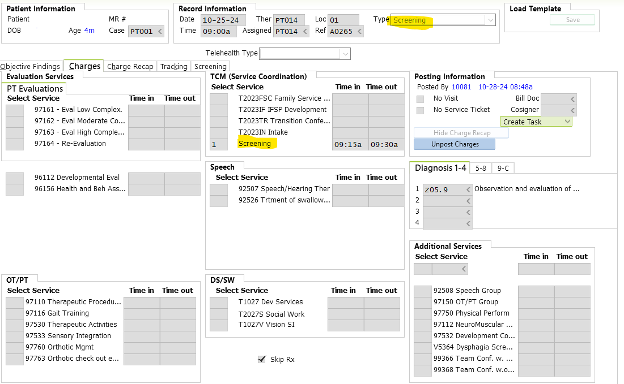
How to- Developmental Screenings Data Entry
- Trigger to know to look for a screening? Set up an auto-task to group 10?
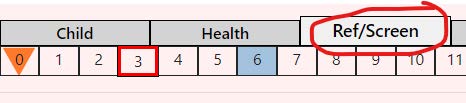
- Once a developmental screening is completed, it needs to be added to the state database under the Ref/Screen tab
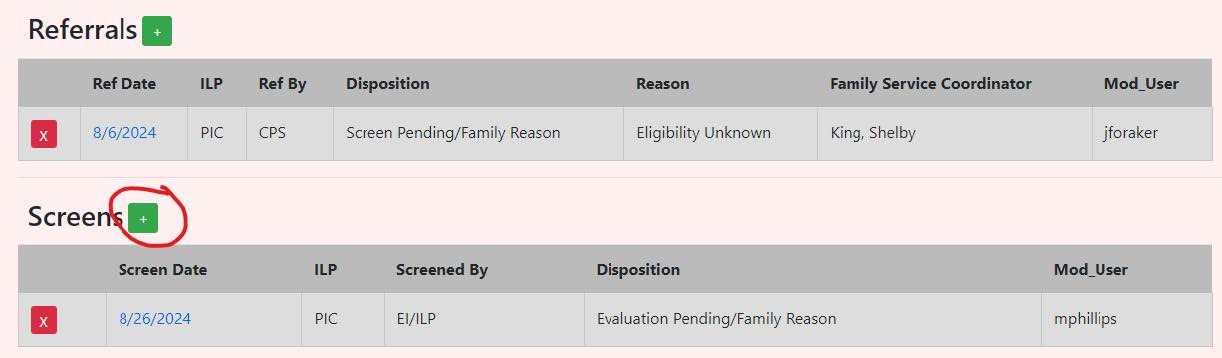
- If there is a reason to pend prior to the screen, the disposition is updated in the referral.
- Add the screen in the Screens subheader with the date of service (ex shown below DOS is 10/22/24) by clicking the green square + sign.
- The “Screened By” will always be EI/ILP
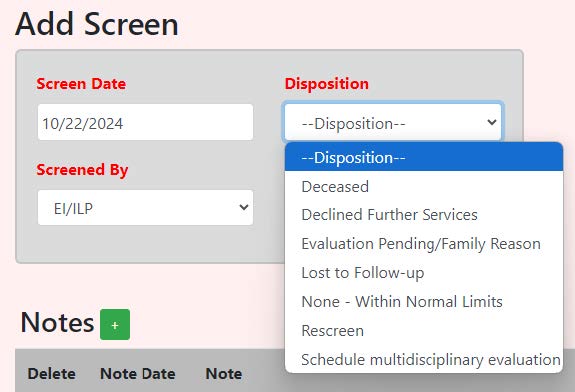
- The Disposition depends on what the recommendation was in the note, but it generally falls into the following categories:
- Declined Further Services: the family doesn’t want to move forward with the PIC process
- None- Within Normal Limits: the provider doesn’t recommend a rescreen and the child falls within normal limits at the time of the screening
- Refer to team: the provider recommends a full evaluation Disposition --> Schedule multidisciplinary evaluation
- Rescreen: the provider recommends rescreening in 1-3 months
- If this is the case, then the child will need BOTH the disposition of “Rescreen” AND “Evaluation Pending/Family Reason” with the following reason for pending:
“The provider recommended that CHILD be re-assessed in # months. The family understands that an evaluation is within their rights, but declines evaluation at this time, preferring to wait # months to rescreen.” - Add the reason for pend, as well as the summary (usually the last paragraph) as a Note with the date as the DOS for the screening.
Example:
LAST PARAGRAPH:
CHILD is a very young infant with a history of drug exposure which puts her at higher risk for developmental delays. CHILD is demonstrating increased extensor tone throughout her body, along with a head-turning preference. Additionally, CHILD presents with poor repertoire of movement as graded by the General Movements Assessment. It is recommended that CHILD be re-assessed in 1-2 months.
PEND REASON:
The family understands that an evaluation is within their rights, but declines evaluation at this time, preferring to wait 2 months to rescreen.
**Make sure the RT status matches the SDB status**
- If this is the case, then the child will need BOTH the disposition of “Rescreen” AND “Evaluation Pending/Family Reason” with the following reason for pending:
- The “Screened By” will always be EI/ILP
- Signature forms needed:
- 1st screening: screening packet, even if 1st screening is WNL, NO PWN is needed.
- 2nd screening: PWN and consent to screen
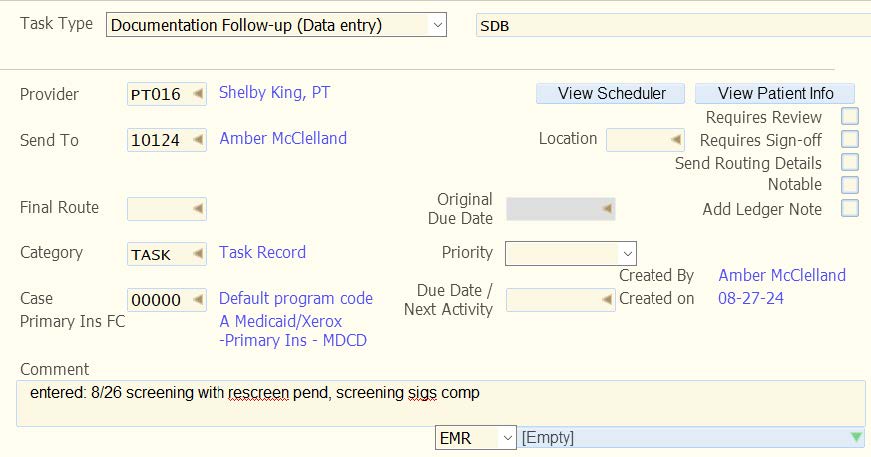
- Add summary to SDB task
- Example: entered: 10/22 screening and rescreen pend, screening sigs comp
Process for Screening NICU Referrals and Conducting the Screening
| Team | Procedures |
|---|---|
| Referral Team | Input client to RT and DB Send list to managers who decide if the child goes to eval or screening within 24 hours of the request to review from the referral team. Referral processes family information, and places name on the referral list indicating file is recommended to go to eval or screen (provider teams assign the screens). Complete a communication log indicating who the assigned provider is after team meeting **Referral offers a screening or an evaluation, based on manager recommendation **Referral assures that the parent knows that screening is a recommended option and also parent can choose evaluation |
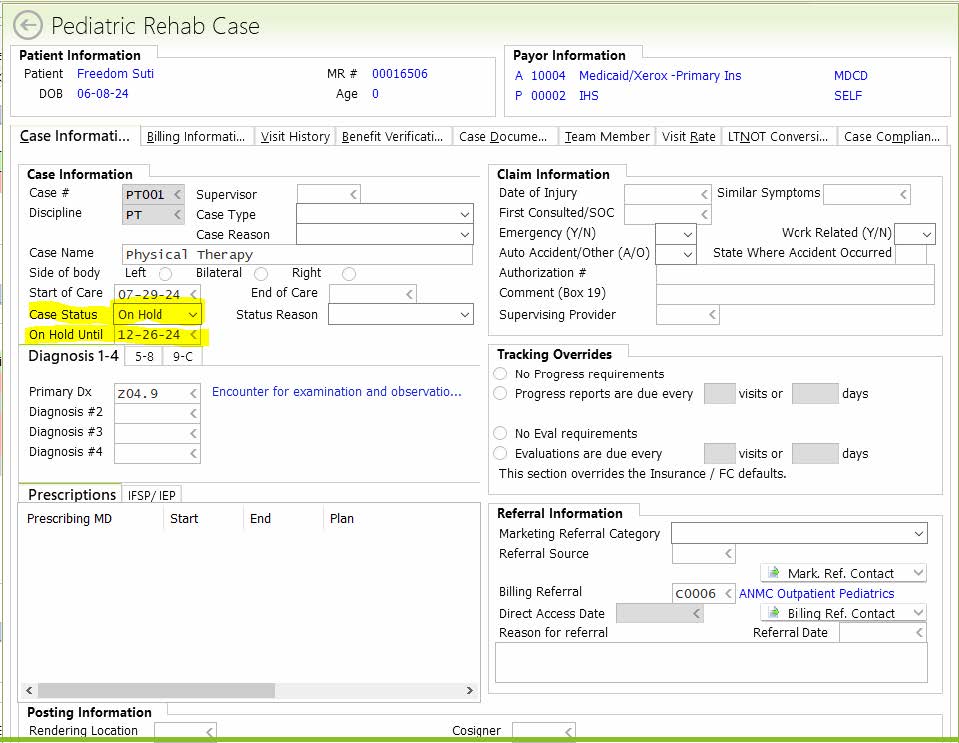
| Manager Team | Reviews the records at request of the referral team Complete an FSC daily note for having reviewed the medical record and recommendation to screen or eval Global abbrev: recreview Emails referral team indicating send to team with screen or eval Distribute referrals at team At assignment for screening Manager changes “case status” to “on hold” and “on hold until” date three months out: see pics below |
| Provider | Complete a full PAPER Screening Packet with family including PWN at the 1st screening. Each subsequent screening only requires a PWN and Consent to Screen. These two documents must be completed at each screening. The paper packets are available in the forms boxes 1st Screening: *Complete a limited intake and relevant medical history, including but not limited to feeding, sleep patterns, baby’s ability to self-comfort. *Screen using HINE, ASQ, GMA and head measurement for plagiocephaly, as indicated. *See actions that are taken below based on screening results *Documentation: 2nd Screening: Prior Written Notice and Consent to Screen
|
Screening Results
*Whenever possible, the same provider who screened completes the re-screen.
**A screen may be converted to a motor evaluation. Following the motor evaluation, the child is referred to team so that a second discipline can complete the appropriate evaluation of the child. Motor evaluation cannot stand alone for evaluation—the law requires a child receive a full evaluation prior to being determined ineligible for services, unless a family declines further evaluation.
Using the Pediatric Rehab Case to show as a screening on Provider Dashboard
Open a new case on the Child record, select the appropriate case for the provider. Select On Hold in the Case Status dropdown, and set the date approx three months out.
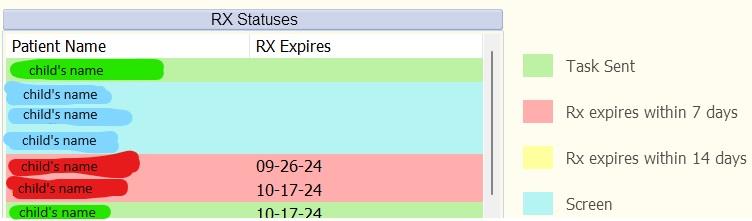
Screenings will appear in blue on the provider’s dashboard:
Global abbreviations:
scrn
“the family understands that an evaluation is within their rights but declines an evaluation at this time, preferring to wait no more than 3 months to rescreen.”
recreview