Children who are in referral but not enrolled: a child whose family is no longer interested in services will be exited using the State-defined reasons for exiting from referral.
Often the State-defined reasons for exit from referral are confused with discharge categories for enrolled children. What follows are the terms we use for children who exit while in referral:
Lost to Follow Up (LTFU): After a 10-day letter has been sent, but we haven’t heard back from the family.
Decline: The family is not interested in moving forward with intake, eval or enrollment. A family can withdraw from the process at any time.
Not Eligible: The child doesn’t qualify for Part C services.
Program Documentation- How to exit prior to enrollment
Types of exit status:
Lost to Follow Up: After a 10-day letter (How to 10 day letter.docx) has been sent, but we haven’t heard back from the family. Decline: Family is not enrolled and is not interested in moving forward with intake, eval or enrollment, family can withdraw from the process at any time. WNL: Child doesn’t qualify for Part C services and the PSP has met with the family to review eligibility.
Steps to Exit
- Review the child’s file to confirm all appropriate documentation has been completed (such as the eligibility meeting if the child is within normal limits).
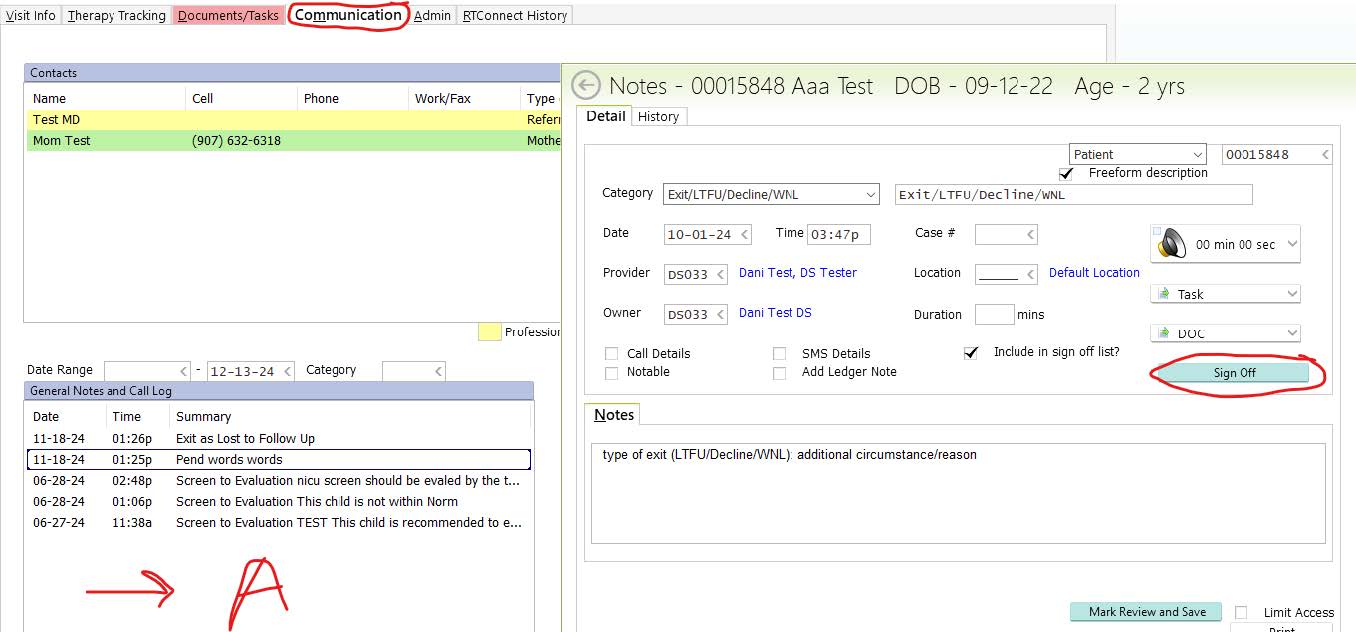
Create a communication log note under the category “Exit/LTFU/Decline/WNL” providing the circumstances of the exit.
Examples:
- LTFU Example: Goofy is lost to follow up. No response from family after 10 day letter was sent on 8/1/24. (The comm log note date would be 8/11/24).
- Decline Example: Guardian, Walt Disney, texted PSP to decline further services from PIC at this time for Mickey Mouse. PSP let Walt know that they could refer back to PIC anytime before Mickey turns 3.
- Not Eligible (Within Normal Limits): Example: Please see daily note 10/1/24 for eligibility meeting, Minnie is within normal limits.
- Sign the communication log note. This triggers a task to be automatically sent to admin. * Note as of December 2024: if you amend your exit comm log note, admin does NOT get a task, so please email admin@picak.org if you need to amend your comm log exit note.