
The Progress note acts as a bridge to discharge in circumstances that we need to meet State Compliance expectations by providing progress but the child has not exited PIC's program yet. This note does NOT exit a child, but can provide most of the information needed to exit.
There are two types of circumstances when an EXCOS appointment or "Progress Note" is necessary:
1) A provider is leaving PIC employment and the new PSP is not familiar with the child. This prevents the new provider who may not be successful connecting with the family, from having to provide information based on the file review without having met the child.
2) Planned appointment with the family to review progress with the IDA-2 for the purpose of planning for discharge, but the child remains enrolled. Depending on the circumstances, when the child is not present, the progress note is a summary of the child’s progress based on the chart review, which can include a progress version of the IDA-2 ("Exit IDAs").
With advance planning, providers may complete a Progress Note and IDA-2 review with the family within 3 months prior to discharge. The directions that follow apply only when a Progress Note is completed as part of a family meeting to measure progress.
- Exit Child Outcomes Summary (EXCOS) Appointment
- Schedule an EXCOS appointment in the RainTree calendar.
- After completing the visit, check in the EXCOS appointment and select “Do not roll previous note.” And complete the following progress note.
- Progress Note Documentation:
IF not adding through the scheduler, you can add the note directly through the child's chart. A to add in the Visit History. Add: Long Term Therapy Note Type: Progress Note
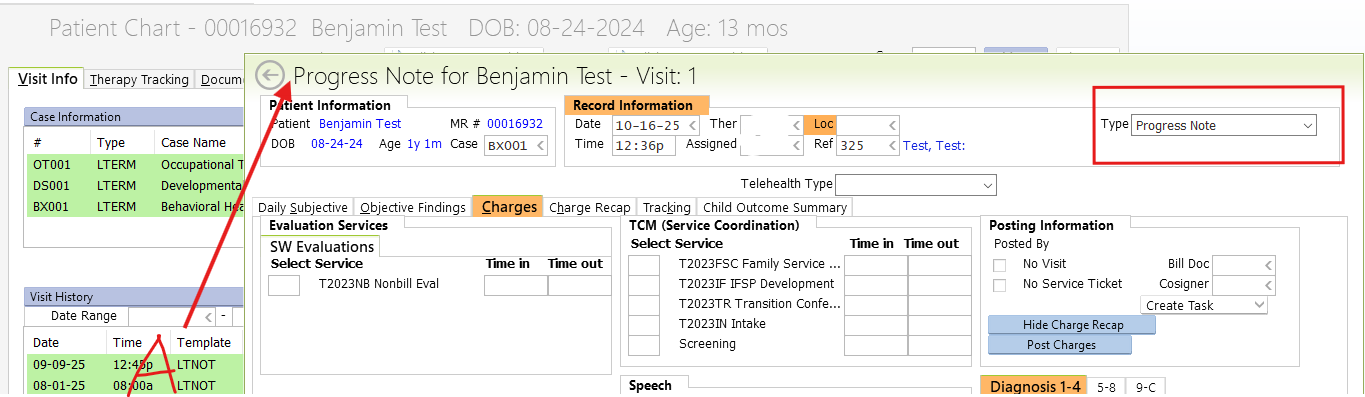
- Daily Subjective: Record child and parent attendance, how information was gathered, and the child’s state during the visit.
- Objective Findings: Enter IDA-2 scores in the Standardized Tests section.
- Charges: Enter FSC clock times.
- Child Outcome Summary Rating: Select “A” to add. Indicate whether the child has made progress (yes/no) and complete the “Describe progress since last rating” box.
- If the family has been out of contact, enter: “The child’s family has been out of contact and last progress noted was [insert].” Provide supporting evidence of observed progress.