
A child may be pended when family or guardian circumstances delay completion of the referral, intake/evaluation, or IFSP. Pending releases the ILP from the 45-day timeline requirement while those family-related circumstances are resolved. Although the 45-day timeline is paused, providers are still expected to move the referral to enrollment as promptly as possible.
Families do not need written notice that a referral has been pended. Providers should verbally inform the family, as appropriate, that the timeline has been paused because of family-related circumstances. No pend letter or formal notification is required.
The State office recognizes only family-related reasons for exempting a child from the 45-day timeline. Even when a child has been pended, providers are expected to continue processing the referral and complete enrollment as soon as the family is available.
Examples family reasons to pend:
- Family cancels for any reason and/or asks to reschedule.
- Family no show
- Family scheduling difficulties. Examples: family: is/will be out of town; your first available appointment is declined and next available is further out; has limited availability to schedule- “I can only do appt’s on Tues & Thurs”.
- Family delay responding to provider’s attempts to schedule. Example: Provider has reached out to the family at least 3 times across a 2-week period without a response from the family or successfully scheduling.
- Unenrolled Children: Requesting Extended Delay for Referral
Unacceptable reason for pend:
- Provider’s first available appointment is after the 45 days- this child should be reassigned at Team.
- Provider availability is limited
- Provider cancellation
- Provider out on PTO
Procedures Direct Service Providers
**Admin will add the pend for a child who has missed the 45-day timeline IF there is a cancel by family (with a reason provided) or no showed appointment in the visit history. However, this is a retroactive pend added only once the 45-day timeline has been missed and is NOT automatic.**
When a child meets the criteria to be pended, take the following steps:
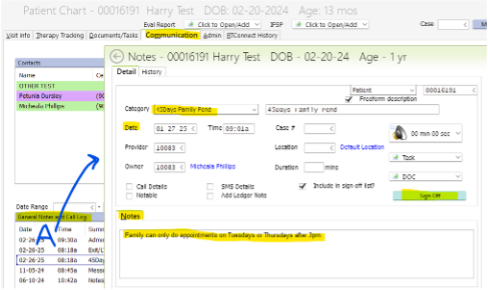
- Add a communication log note under the Category “45Days Family Pend” from the drop-down menu.
- Make sure the date of the comm log note matches the date of the reason for pend (it defaults to the current date).
- In the Notes section detail the specific reason for the pend. EX: Family is out of town for the next 2 weeks and so intake is scheduled for mm/dd/yy.
- Sign off on your comm log note.
Admin receives an automatic task once the comm log note is signed off, so no further notification is needed.
Procedures to Pend for Admin
The automated task will come to group 10, with the date and reason for pend provided in the comm log note. It is Admin’s responsibility to ensure the reason given for the pend is a family reason for delay and accepted by the State.
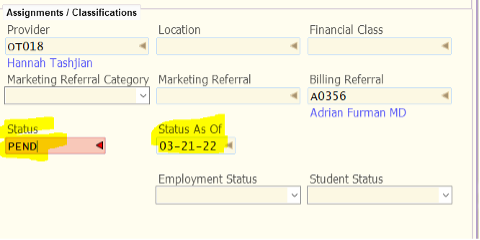
Pend in RT by changing the status of the child in the Patient Demographics tab to PEND and correcting the date to match that of the comm log/visit cancellation.
Note: a child can be pended for each and every step of the enrollment process, as long as it’s before IFSP. This includes pending at Referral, Screen, Intake, and Evaluation. However, since once a child is pended, the timeline is put on hold, we don’t require multiple pends. If the pend is over 100 days, review the timeline and see if there are multiple reasons for the delay. This is reviewed in the Reminders Report process by the Office Manager.
For the SDB: If the PEND occurs between Referral and Eval, you will choose the Referral, or if the PEND occurs prior to IFSP but after Eval you will choose Eval.
Referral: To pend for the screen or evaluation appt., use the Referral tab, add a new disposition based on which appt. was pended, for the Screen appt. select ‘Screen Pending/Family Reason’, for the eval appt. select ‘Evaluation Pending/Family Reason.
*In the Notes section, copy the reason for the pend from the comm log, write Pend, the date the child was pended, and the reason.”
Screen: To pend for the evaluation appt. after a Screening has been completed, use the Screen tab, add a new disposition of ‘Eval Pending/Family Reason’.
*In the Notes section, copy the reason for the pend from the comm log, write Pend, the date the child was pended, and the reason.
Evaluation: To pend prior to the IFSP appt., use the Eval tab, enter the date pended and reason in the Notes section of the state database. For disposition, select ‘Enrollment Pending/Family Reason’.
*In the Notes section, copy the reason for the pend from the comm log, the date the child was pended, and copy the reason for the pend from the comm log.