
How to- Reminders Report
- All Reminder Reports information is kept on the State Database site: CURRENT Reminders reports (or the Archived subfolder). The current month is saved as - Reminders MONTH YEAR
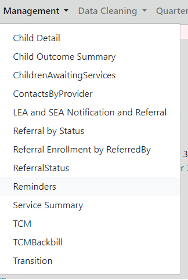
- To pull the Reminders report from the State Database under the Management tab “Reminders” with the default As of Date and “Select All” for the providers, then Export to Excel. This is a big report, so be patient as it loads to Excel.
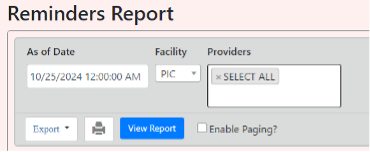
- Open in the Excel app and enable editing. No need for the Document Map tab (okay to delete). The categories on the Reminders Report as of 9/10/24 are:
- Initial IFSP Due
- Enrolled Children with No Completed Visit Contact Date in Past Month
- Transfer IFSP Revision Due -> not accurate
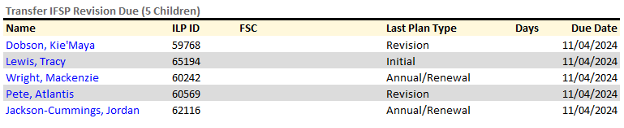
- IFSP 6 Month Review or Annual Renewal Due à for manager/provider review
We don’t get State compliance review of this category, so reach out and remind the manager that it is still in the red for reminders-please review this - IFSP Service Start Date Due
- IFSP Service Start Date Missing: usually do not have any data in this category
- Initial COSF Rating Due
- Exit COSF Rating Due
- Annual Evaluations Due -> for manager/provider review
We don’t get State compliance review of this category, so reach out and remind the manager that it is still in the red for reminders-please review this - Start Transition Plan by Age 30 Months
- 90-Day Transition Meeting Due
- LEA Notification Due
- Child Status
- Enrolled Past 3rd Birthday
- Anything highlighted yellow means that action was needed by the provider and should be confirmed that the action was taken before compiling next month’s report.
- Once reviewed, publish on the Intranet/send email out to all staff with a link to the report and a reminder, “please be sure to review the IFSP 6 Month Review or Annual Renewal Due and Annual Evaluations Due sections. Anything highlighted yellow has already had a task sent when needed.”
Review Process by category:
Initial IFSP Due
Purpose: This category checks for the 45-day timeline and only pulls children who have NOT been pended, but it pulls any child in process (aka even those that just were referred the day the report is pulled)
Action needed: review any child that is overdue (negative red number for days), check for any reason to pend- i.e. cancel by family, no show, multiple attempts to contact family without response in comm log. If there is a reason to pend, add pend per How to-Pend.docx
If no reason to pend is found, send task to provider under “Reason for Delay” with free form reason “45 days was mm/dd). The body of the task is:
Hi PROVIDER
45 days for CHILD was DATE, however I don't see any cxf or reason to pend in the comm log. Can you please review the circumstances and let me know the reason for the delay?
Thanks,
Enrolled Children with No Completed Visit Contact Date in Past Month
Purpose: This category attempts to make sure no child falls off the radar. Check for frequency on the most recent IFSP matches, for children who have not been seen in the past 2 months.
Action needed: review any child that is hasn't been seen in 2 months, check for any reason for the lack of visits- i.e. cancel by family, no show, multiple attempts to contact family without response in comm log and if no reason is found, send task to provider under “Reason for Delay” with free form reason “_____ Frequency not being met). The body of the task is:
Hi PROVIDER,
It looks like CHILD hasn't been seen since DATE, but the frequency on the IFSP is set to FREQ. I don't see any additional comm log notes or cxf. Can you please review and let me know the circumstances?
Thanks!
IFSP Service Start Date Due
Purpose: This category reminds providers about the Timely Services Indicator on the DCR. With weekly DCR-2 review and Transfer Report checks, there *shouldn’t* be any new names on this list that haven’t been caught, but it’s a great double check.
Action needed: review the chart for any obvious reason for the delay- i.e. the family has cancelled or no showed, if nothing in the visit history or comm log to justify the delay send a task to the provider under “Reason for Delay” with freeform reason “SERVICE TYPE [ST/PT/OT/SI] due as mm/dd” The body of the task is:
Hi PROVIDER,
[Any circumstances found], but no other reason for delay since SERVICE was due as of mm/dd. Can you please review the circumstances and let me know the reason for the delay?
Thanks!
IFSP Service Start Date Missing
Purpose: In case an IFSP was added without a start date. This very rarely happens in PIC’s process, but it’s a great double check
Action needed: most likely would be missed data entry, since IFSP is reviewed before entered into the SDB. Review the IFSP in RT and add any missing data.
Initial COSF Rating Due
Purpose: Outcomes are required at enrollment and exit, so this checks for the enrollment outcomes (or COSF- Child Outcome Summary Form). This is part of PIC’s functional evaluations. Again, this very rarely happens in PIC’s process, but it’s a great double check
Action needed: most likely would be missed data entry, since functional evaluations are reviewed before being entered into the SDB. Review the functionality in RT and add any missing data.
Exit COSF Rating Due
Purpose: Outcomes are required at enrollment and exit, so this checks for the exit outcomes (or COSF- Child Outcome Summary Form). Exit outcomes are not always required, so this is trickier. Exit COSF are needed when the child has been enrolled for more than 6 months. Even if the child has had a recent re-eval, we need to note if progress was made or not, so that will need to be noted on the Discharge summary, but the provider can roll those re-eval scores if the re-eval was within 3 months.
Action needed: This should be the same list of children as those Enrolled Past 3rd Birthday, but it also includes those upcoming discharges for providers to review. The task is “Discharge Summary” with freeform reason depending on whether or not exit IDAs are needed (if no recent re-eval then exit IDAs will be needed as well). The body of the task is:
Please complete discharge summary [with exit IDAs and] outcomes since more than 3 months since last eval and enrolled for more than 6 months.
Start Transition Plan by Age 30 Months
Purpose: The Transition Plan IFSP needs to occur when the child is between 24-30 months. Technically the Transition Plan IFSP isn’t late until 33 months, but the state reminder is set for 30 months. This is a specific IFSP (but can be combined with a revision or annual IFSP) and is marked in the State Database with a check mark.
Action needed: If no Transition Plan IFSP is missed in data entry, review any cancellations or comm log notes with reason for the delay. The task for the provider is still Reason for Delay with freeform reason “Transition Plan IFSP due as of mm/dd.” The body of the task is:
Hi PROVIDER,
CHILD's Transition Plan IFSP was due as of mm/dd. I don't see any cxf or comm log notes with the reason for the delay. Please review and let me know the circumstances of the delay, otherwise get the IFSP scheduled ASAP.
Thanks!
90-Day Transition Meeting Due
Purpose: Much like the TP IFSP, there needs to be a Transition Conference IFSP by the time the child is 33 months old. Usually, ASD is involved in this IFSP, however even if the family has opted out of ASD, they still are required to have a TC IFSP. The reminders report is the ONLY place this shows up, it is NOT on the DCR-2 until after the child has exited, so this is ESSENTIAL to check.
Action needed: Sometimes providers will document the Transition Conference as FSC with ASD rather than an IFSP, so be sure to check daily notes. The task for the provider is still Reason for Delay with freeform reason “Transition Conference IFSP due as of mm/dd.” The body of the task is:
Hi PROVIDER,
CHILD's Transition Conference was due as of DATE. I don't see any cxf or comm log notes with a reason for the delay. Could you please review the chart and let me know what the circumstances of the delay are?
Thanks,
LEA Notification Due
Purpose: Notification to the Local Education Agency (LEA) is generated by the SDB report “LEA and SEA Notification and Referral Report” when the child turns 30 months. This is only for enrolled children, so those who enroll after 30 months get added to the list upon their Initial IFSP, however, this can get tricky when closer to the 33-month mark. LEA Notification does NOT have a reason for delay after 33 months, so we must catch our 30-32- and 29-days kids with a manual check when pulling the LEA report weekly by checking the waitlist children’s DOB. If the child is enrolled (has their IFI) AFTER they are 33 months old, then we are exempt from LEA notification/referral.
Action needed: This is hopefully a double check, but if there is a name under this category, send a special notification over to ASD ASAP via Panda Doc. See instructional How To- ASD LEA Notification Report.docx
Child Status
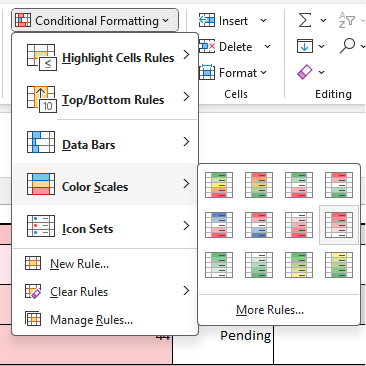
Purpose: This category checks for extended pends. The Initial IFSP Due *should* catch all the kids who haven’t been pended and have missed their 45 days, but this category is a more extended list. To make sorting this list easier, make a new tab and create a table (you’ll have to delete the extra columns that inevitably pop up with creating the table). This allows the list to be sorted and conditional formatting to be applied. Under Conditional Formatting, Color Scales, Dark red to white (2nd row on the far right).
This is subject to judgement, but I recommend checking into (reviewing the chart for a reason for pend/delay) any child that is:
- close to the 45 days and doesn’t show as pended
- pended for more than 100 days
Action needed: Send the provider a task checking in on either a reason for pending or long pend.
Reason for pending: Send task to provider under “Reason for Delay” with free form reason “45 days was mm/dd). The body of the task is:
Hi PROVIDER
45 days for CHILD was DATE, however I don't see any cxf or reason to pend in the comm log. Can you please review the circumstances and let me know the reason for the delay?
Thanks,
Pend for more than 100 days: Send task to the provider under “Reason for Delay” with the free form reason “long pend”. The body of the task is:
Hi PROVIDER,
I see that you have reached out to the family to schedule evaluation/review results, but without response from the family. Would it be appropriate to send a 10-day letter? Child has been pended over 100 days.
Thanks,
Enrolled Past 3rd Birthday
Purpose: Children cannot receive Part C services after age 3. It is expected that they are discharged within 10 days of their 3rd birthday. Our current discharge process is rather complicated and confusing, so it’s helpful to let the provider know if exit IDAs and exit outcomes are needed or if we just need a discharge summary.
Action needed: Review the chart for length of enrollment, recent eval, and if there’s already a progress note before tasking the provider for the Discharge Note task type and the body of the task as either:
- Please complete discharge summary, no exit IDAs or outcomes needed since not enrolled more than 6 months.
- Please complete discharge summary with exit IDAs and outcomes since more than 3 months since last eval and enrolled for more than 6 months.
**Staff and Data entry: Being enrolled in part B and Part C at the same time is considered “double dipping” or enrolled for duplicate services, which is not approved. We recognize that families may want to stay with PIC for services until age 3 (ie, not ready to enroll, services with PIC are the best fit until age 3, etc.). If parents choose to continue services with PIC, providers will document in the daily note or comm log depending on the circumstance.
Parent decided to continue with PIC services until age three and defer ASD enrollment until that time.
Send to Providers
Post to the Intranet, choose your type of post and image
Link to CURRENT Reminders reports folder (or that month’s specific report, the previous months’ reports should be moved to the ARCHIVED months folder).
As usual, please be sure to review the IFSP 6 Month Review or Annual Renewal Due and Annual Evaluations Due sections. Anything highlighted yellow has already had a task sent when needed.
Post and send to PICEmployees@picak.org