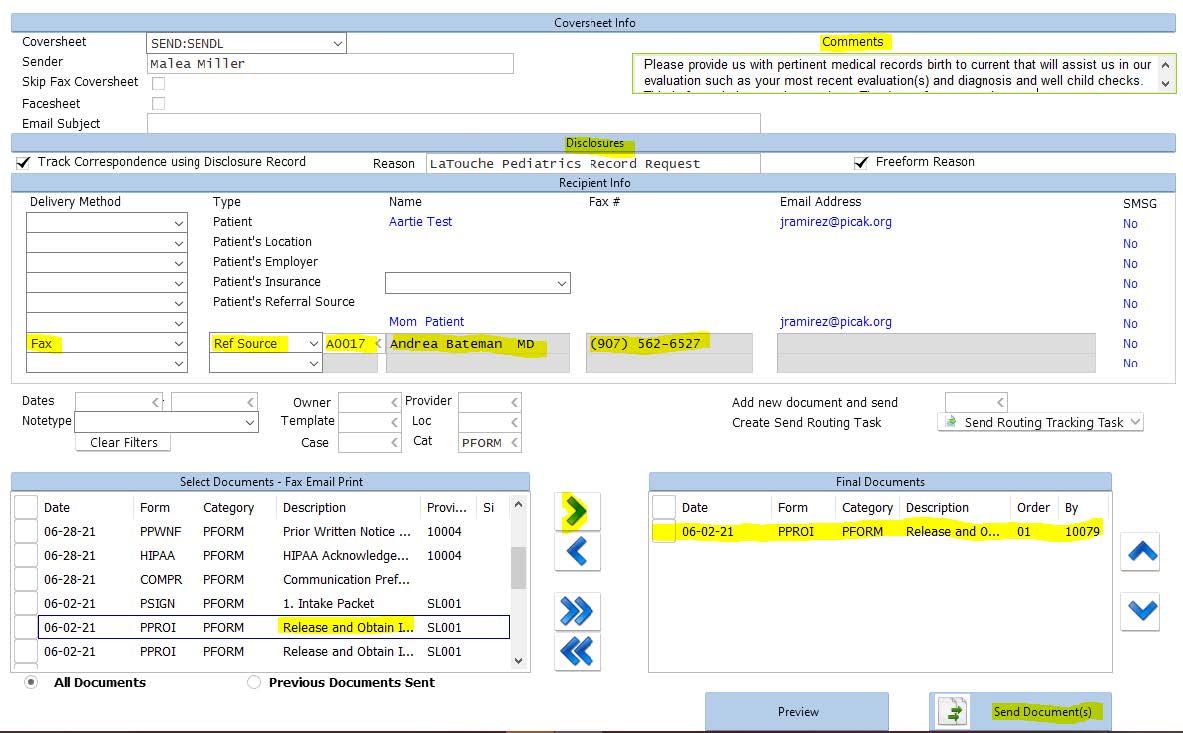
Gathering a child’s medical and developmental records is essential to gain an understanding of their health history and unique needs. All available information guides the early intervention team in developing personalized, effective services and ensures coordinated care among providers and families. Accurate records also support compliance with legal requirements and informed decision-making for the child’s optimal development.
PIC adheres to HIPAA and FERPA regulations; providers obtain written authorizations from the legal guardian to release PIC records. We do not release any information by verbal consent, we must have a signed ROI for records released both written and verbally.
An authorization to Release or Obtain Information (ROI) is considered valid for the duration of child’s enrollment when requesting information from one agency or person. The parent or legal guardian needs to complete a separate ROI for each person or agency from whom information is being requested.
OCS currently uses an alternate ROI signed by the legal guardian (the OCS case worker).
Initiating an ROI: send email to admin@picak.org once ROI is created for family to sign. Admin gets a task for all signed ROIs and will request records once family signs specific ROI.
- Check the appropriate boxes indicating if information is to be released to or obtained from the stated individual.
- Have the parent authorize. RT will date for the signature.
ROIs are valid 90 days after discharge, unless revoked sooner by family, check end dates in RT.
Revocation of ROI:
- If the family wishes to revoke the ROI have the family sign the reverse of a hard copy that you take out to them—there is not an e-revocation.
- Admin will end the e-ROI in RT.
- FOR OCS, when there is a change of placement: Notify Admin (admin@picak.org) who will end the current ROI. Contact OCS for a new ROI with the new family. Contact Referral if you run into barriers with OCS.
- If OCS closes a case and child is either returned to family or is adopted, providers will notify notify Admin (admin@picak.org) who will end the current ROI. New ROIs/eforms in RainTree will need to be signed by the family.
Admin Procedure
As of 4/15/2026, PIC Admin will automatically request records under the following conditions:
- An OCS ROI listing medical source(s) is received.
- No medical records have been received by the time the Intake note is signed off.
PIC Provider Requesting Records
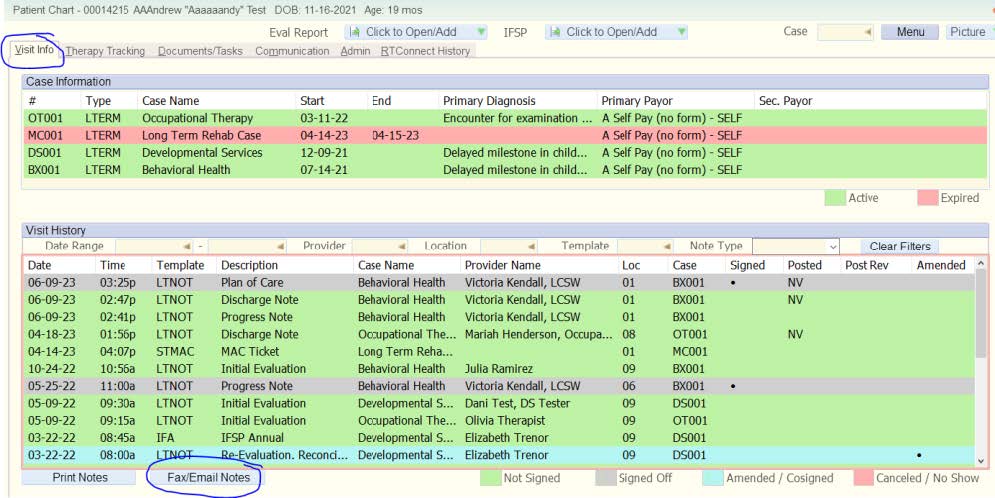
- Go to child’s chart
- Click on “Visit Info” tab
- Click on white button “Fax/Email Notes”
- Add cover sheet/special request information to “Comments” box, our typical message when requesting records is:
Please provide us with pertinent medical records birth to current that will assist us in our evaluation such as your most recent evaluation(s) and diagnosis and well child checks. This is for early intervention services. Thank you for your assistance.
(it’s in RainTree as a Global Abbreviation so you can just type “medrec” and hit the space bar and it will autofill, or you could save it as an electronic sticky on your desktop) - Add Disclosure reason: “Recipient” Record Request (this will auto populate if you are only sending 1 document with that document’s name)
- Choose Fax, Ref Source, Name, Fax Number
Special note: the larger entities have a specific medical record fax, so those are saved in the REF SOURCE table as ANMC Medical Records and Providence Medical Records. You can type in the box next to Ref Source and it will search the whole table or click on the arrow and use F to find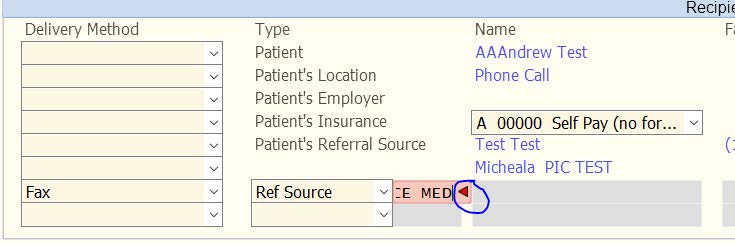
- Find applicable ROI by changing category to PFORM *or* clear filters to find wet signature scanned document and move to “Final Documents” Box by the right arrow next to the select documents box
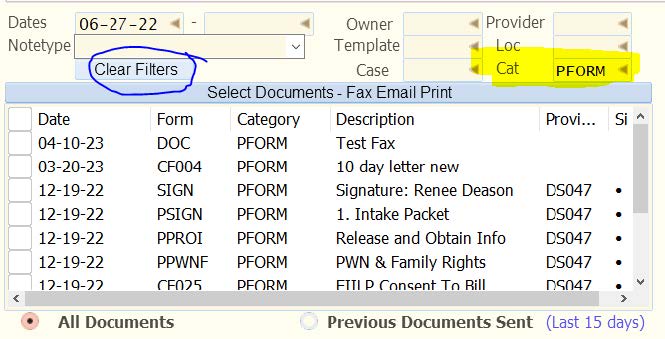
You can make sure it’s the correct ROI by double clicking on the PFORM ROI and choosing either option.
- Send Document
- F10 or Save (if you F10 first, the document will NOT send)
It should look something like this: